
Organize tickets, backlogs, priorities, service levels, and approvals. Keep failures and rework visible until the work is complete.
Explore service deliveryService management. Project delivery. Endpoint operations.
Sentinel Desk
Resolve requests, deliver projects, and keep client work connected with Sentinel Desk. Sentinel Assistant and Patch Sentinel are coming soon, extending that work to your desktop and endpoint operations.
Sentinel Desk Plan, support, and deliver
Sentinel Assistant Bring context to your desktop · Coming Soon
Patch Sentinel Prioritize and remediate · Coming Soon
Sentinel Desk product preview
Connected work. Clear ownership.
Every request has a bigger picture.
A support issue affects a person. A patch failure affects a service. A delayed task affects a project. Sentinel connects the work to the people, assets, and priorities behind it, so your team can act with context.
- Deliver
- Align programs, projects, people, and budgets.
- Support
- Manage requests, service levels, ownership, and follow-through.
- Improve
- Connect endpoint evidence, remediation, and operational reporting.
Explore the platform
The tools to run the work.
The context to move it forward.
Bring service delivery, project execution, and endpoint operations into a connected workspace. Keep day-to-day work visible without losing sight of the bigger commitments.
Coordinate programs, projects, milestones, dependencies, and team capacity. Track remaining effort with forecasts and burndown.
Explore delivery planningConnect discovery, inventory, CVE evidence, business impact, testing, and deployment results with accountable ticketed work.
Explore Patch SentinelBring briefs, tickets, reports, and endpoint context together in Sentinel Assistant, with access governed by the user's permissions.
Explore Sentinel AssistantTrack time, workload, budget, and billing. Drill into service performance, rework, and delivery risk, then share the results.
Explore operational reportingLaunch ticket-linked support from Desk or the CMDB, with browser and desktop console options for enabled Windows endpoints.
Explore Remote Support beta01CaptureRequests, alerts, risks, and planned work
02PrioritizeBusiness impact, SLA, capacity, and dependency
03CoordinatePrograms, projects, tickets, owners, and approvals
04ActAssist, test, deploy, remediate, and support
05VerifyOutcomes, evidence, and rework
06LearnOperational intelligence and executive reporting
Built around your work
One team or many.
A shared way to get things done.
From a small internal team to multi-program operations, shape the workspace around your organization. Support commercial delivery, internal initiatives, and mission-driven work.
IT and service teams
Manage employee requests, link the affected device, prioritize patch exposure, and keep resolution history with the ticket.
Connect service and endpointsSoftware and product teams
Move bugs and features through configurable workflows. Balance delivery capacity, track milestones, and surface rework before it disrupts the plan.
Keep delivery on trackProfessional services
Connect client programs and project commitments with time, budgets, work packages, and billing visibility.
Connect effort and outcomesBusiness and nonprofit teams
Coordinate internal projects, community initiatives, and operational requests with clear owners, deadlines, risks, and progress reporting.
Bring the plan togetherA CLOSER LOOKThe view changes.
The view changes.
The work stays connected.
Start with a ticket. Follow it through the schedule, the team's capacity, and the final report.
See the work behind the deadline.
Bring programs, projects, tickets, and milestones into a shared schedule. Follow progress and dependencies, then drill into the work that needs to move.
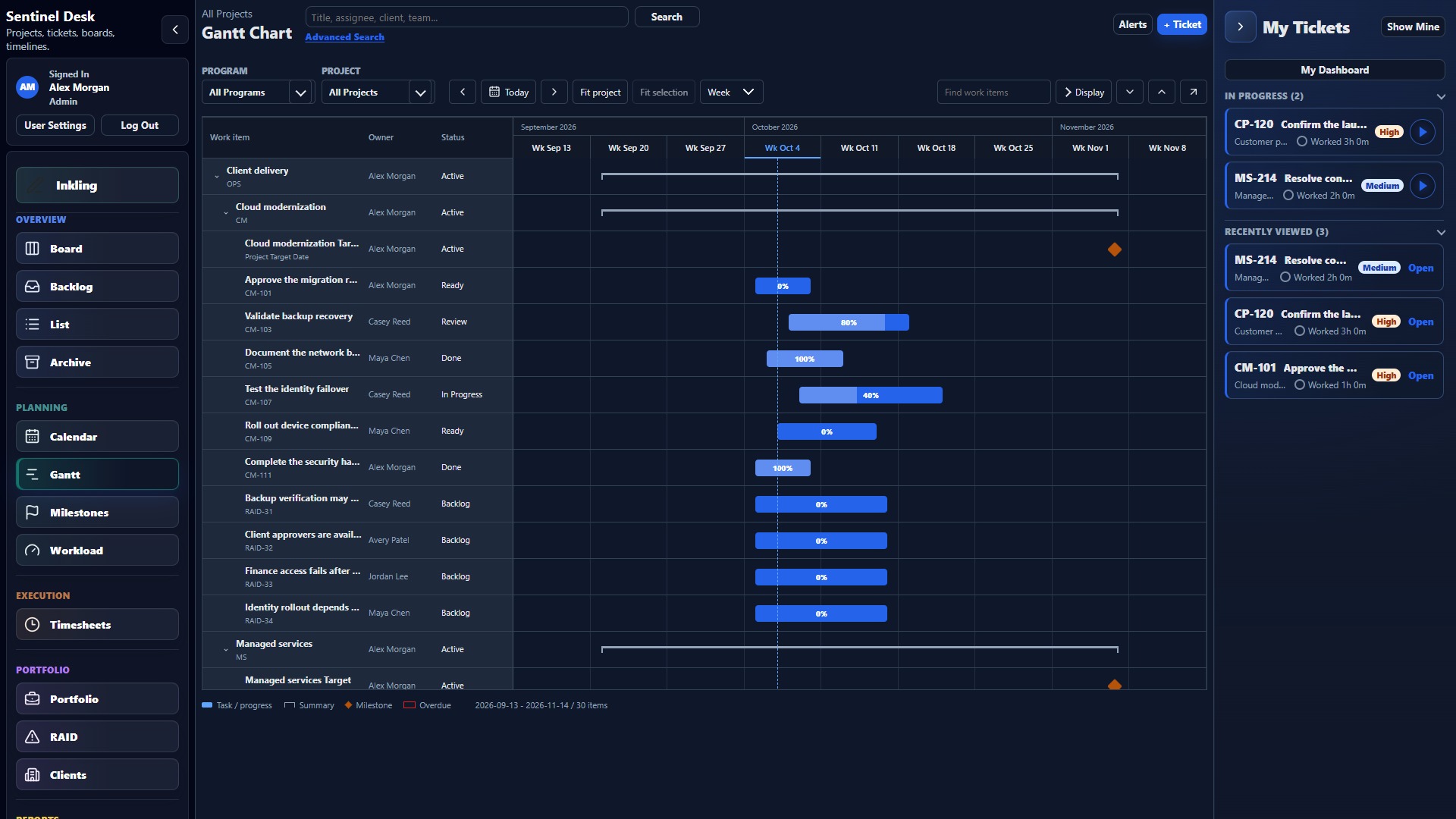
DependenciesMilestonesBaselines
BUILT AROUND YOUR WORKING DAYKeep your bearings.
Keep your bearings.
Or make more room.
Navigation on the left. The work in the middle. Your tickets on the right. Collapse the side panels when you need the space.
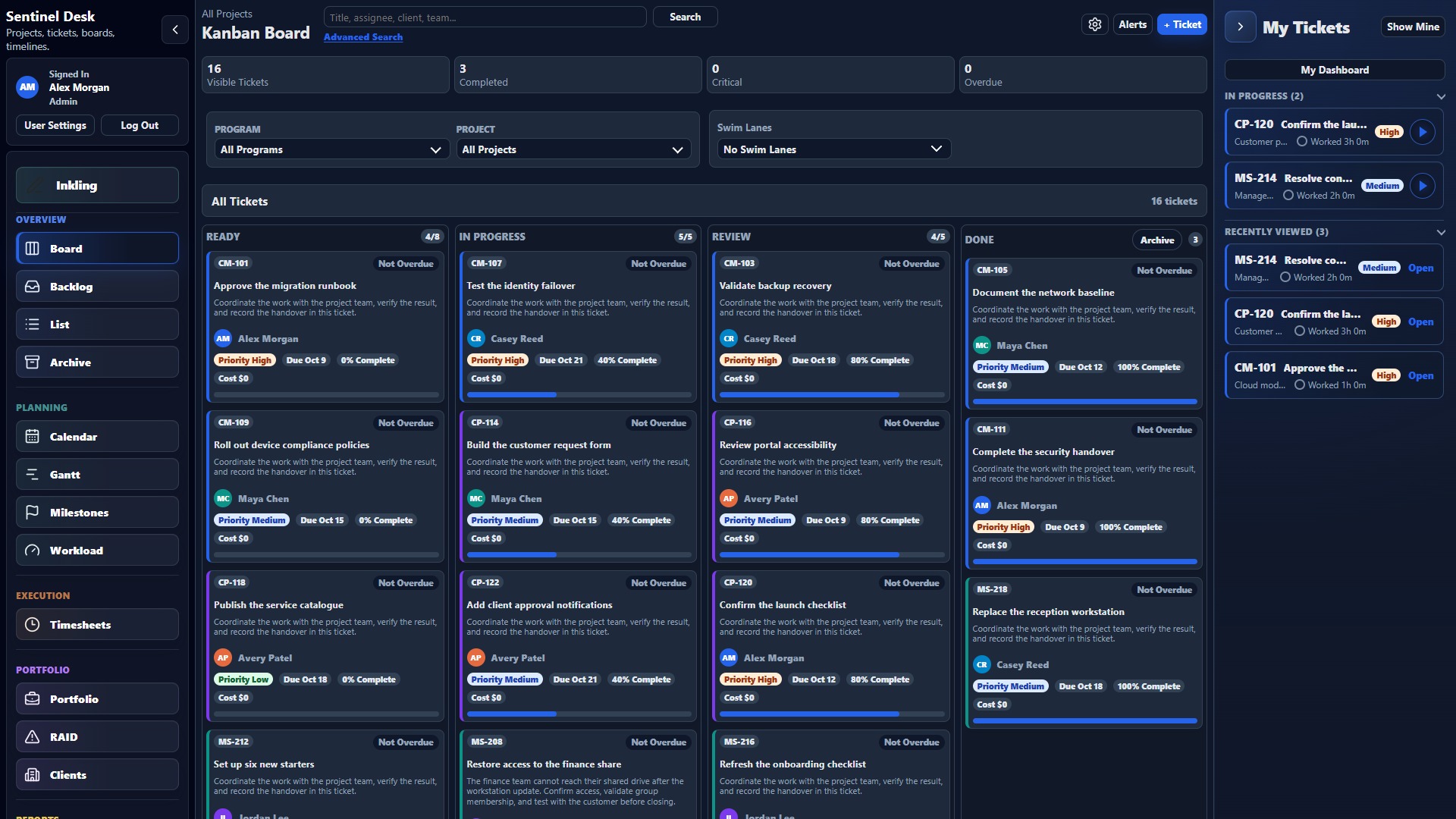
Move between views, programs, and projects from the left sidebar.
Keep the active board, schedule, or ticket in the center.
Your tickets and timers stay at hand without taking over.
Resource planning and delivery intelligence
See what's on track.
Know what needs attention.
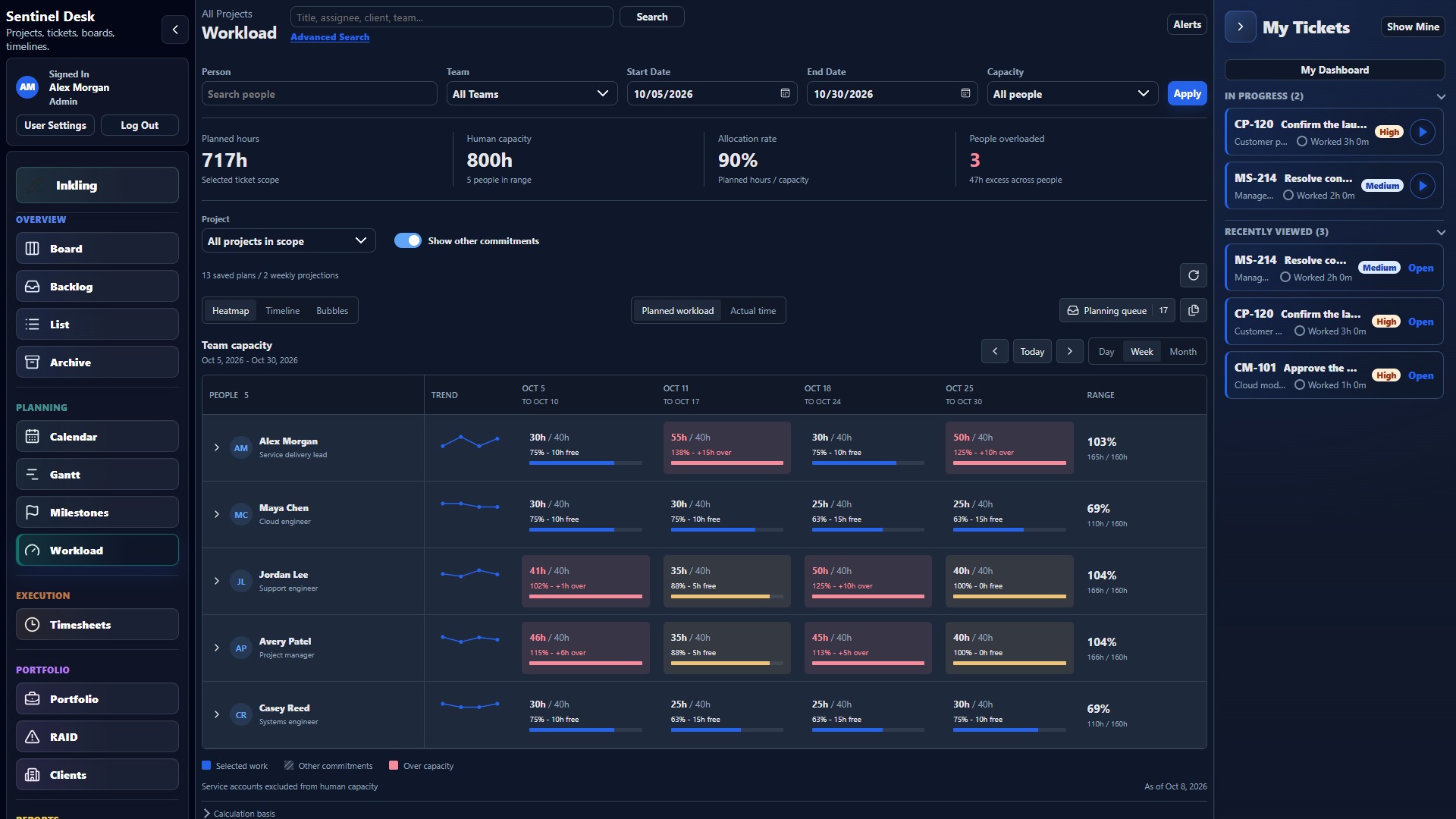
Bring program and project forecasts, remaining-effort burndown, weekly capacity, and budget signals into the same conversation. Make informed trade-offs before an overloaded team becomes a missed commitment.
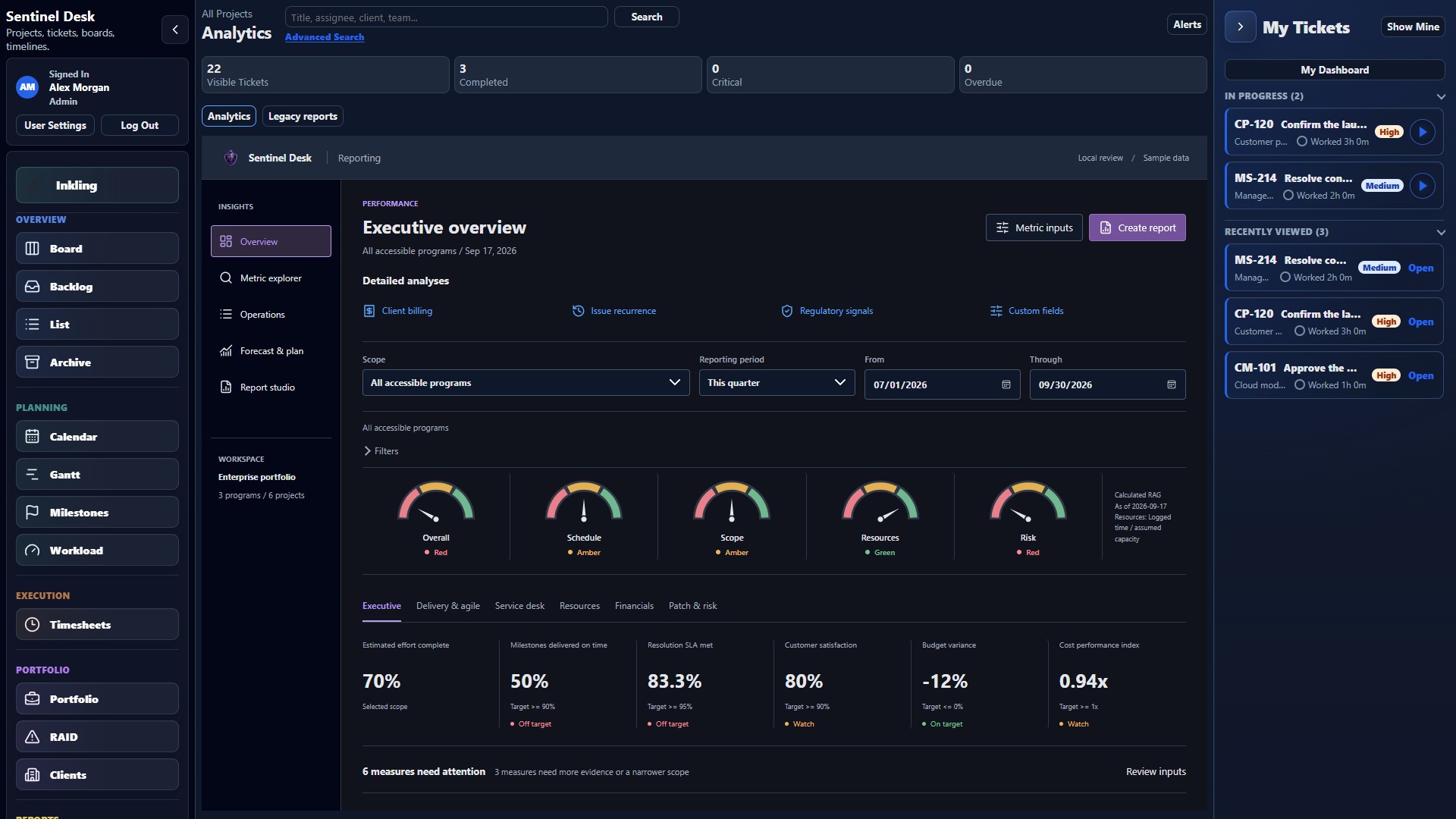
- Forecast with context
- Compare planned progress, actual remaining effort, and projected completion at the program or project level.
- Balance the workload
- See weekly allocation and capacity risk so you can adjust scope, staffing, or dates.
- Separate effort from delay
- Work logs measure time spent working. Stage history shows how long work waits or remains in a workflow step.
Ticket operations reporting
Answers for the team.
Clarity for the business.
Go beyond a count of closed tickets. Understand where work slows down, what rework costs in effort, and how service performance connects to delivery.
- Analyze ticket flow, time in stage, service levels, aging, failures, and rework.
- Drill into programs, projects, teams, contributors, tickets, stages, and priorities.
- Connect timesheets and billing views to client and project work.
- Share Ticket Operations reports as Excel, PDF, or PowerPoint.
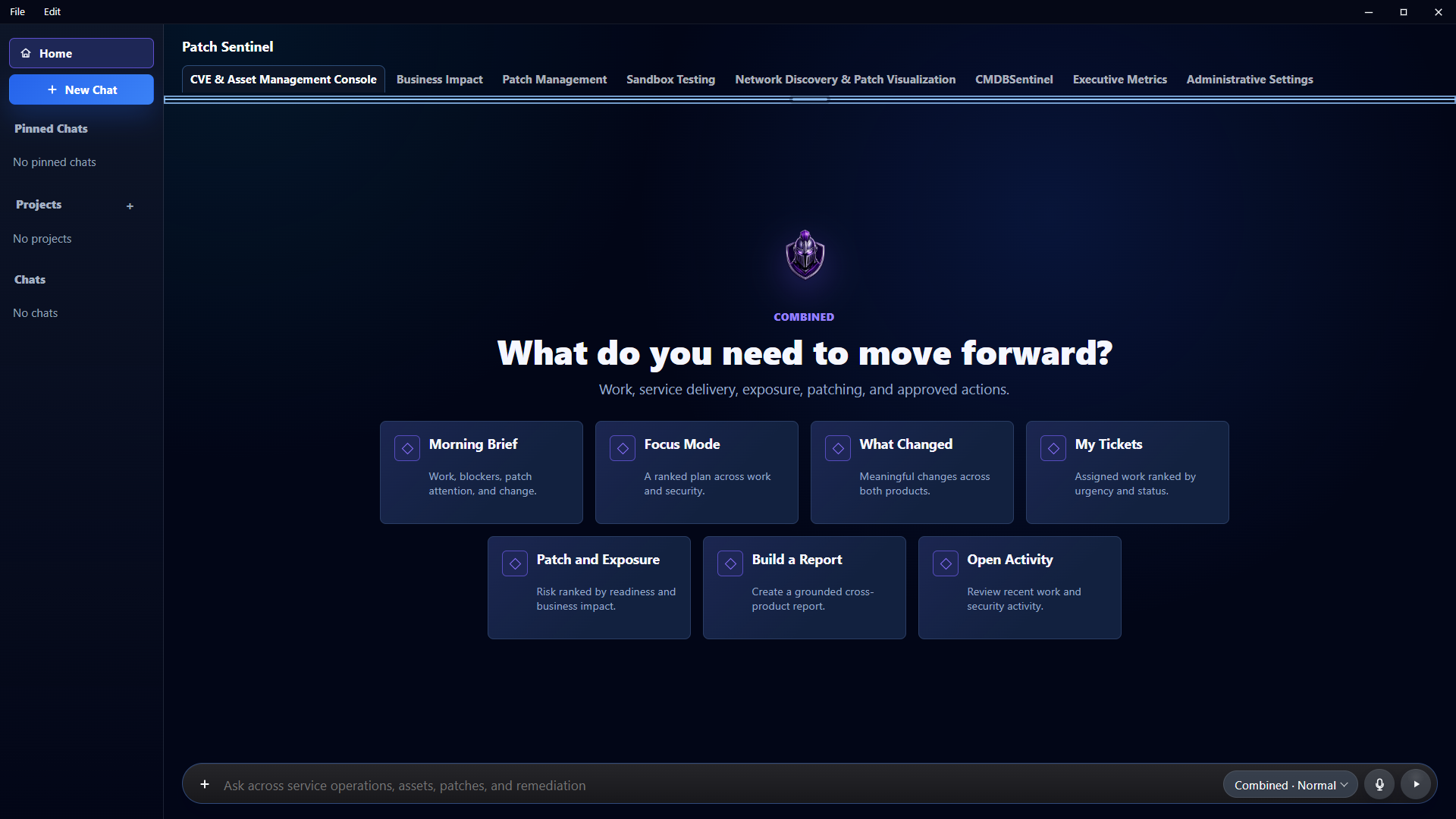
Sentinel Assistant Coming Soon
Your work, in context.
Right on your desktop.
Bring Desk and Patch Sentinel into your working day. Sentinel Assistant combines AI-assisted conversations with the tickets, activity, reports, and endpoint context you are authorized to access.
- Start informed: review your morning brief, changed work, tickets, and priorities.
- Stay connected: move between Desk and Patch context in the Combined workspace.
- Bring the device into view: enrolled endpoints report inventory and health to support CMDB context.
- Keep authority explicit: permissions and approval requirements govern supported actions.
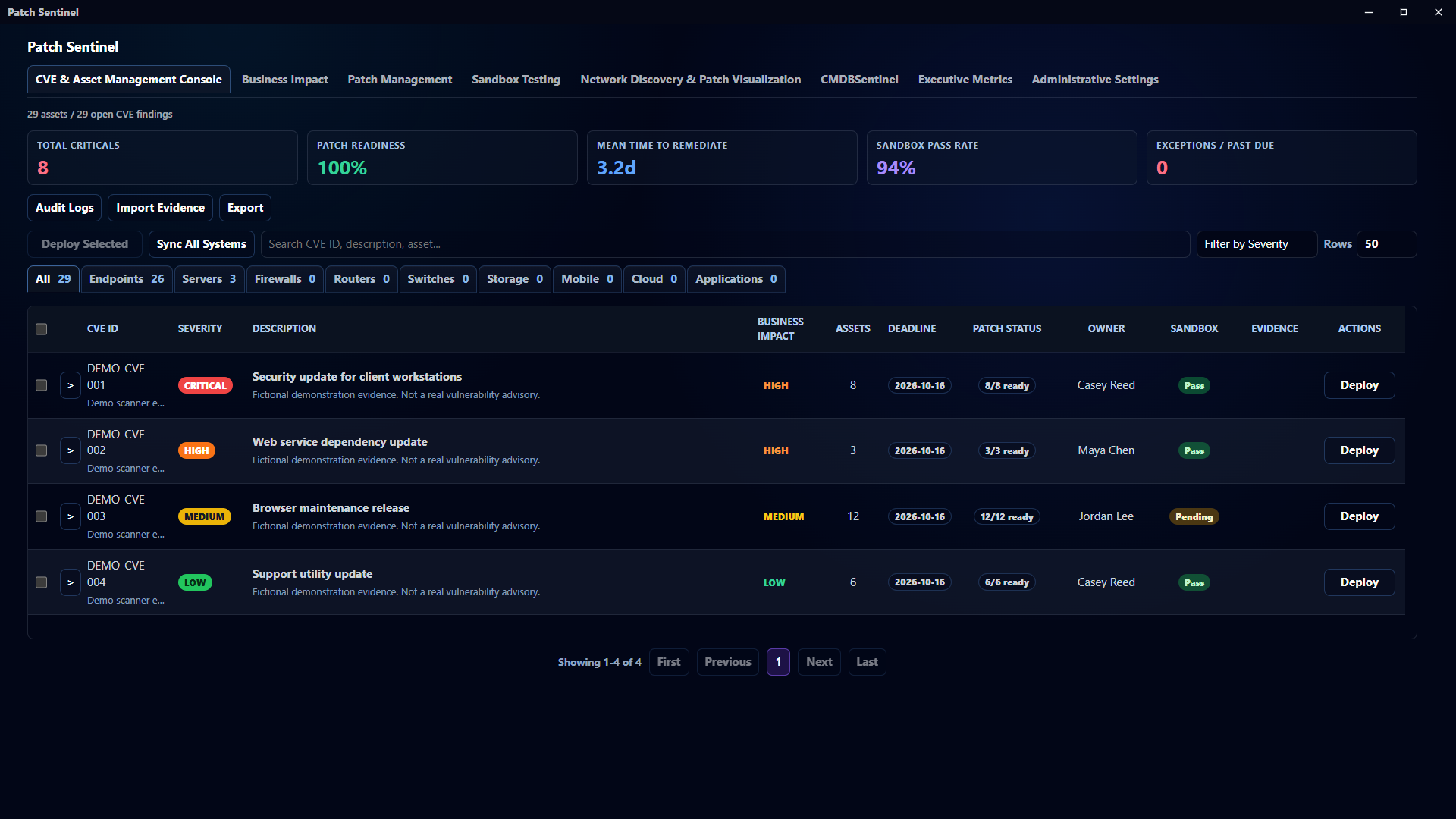
Patch Sentinel Coming Soon
Know what's exposed.
Own what happens next.
Turn endpoint evidence into a prioritized remediation workflow. Patch Sentinel connects asset context and business impact with testing, deployment, and results, so remediation is work you can track.
- Understand the environment: network discovery, CMDB alignment, agent inventory, and asset relationships.
- Prioritize with evidence: imported CVE findings, affected assets, business impact, and remediation readiness.
- Control the rollout: sandbox evidence, patch workflows, deployment status, and verification.
- Keep failures accountable: deployment tickets preserve ownership, failure, and rework in Sentinel Desk.
Remote Support · Opt-in beta
From the ticket.
To the endpoint.
When a conversation or patch retry is not enough, continue the investigation on the device. Launch support from a Sentinel Desk ticket or Patch Sentinel CMDB record, with the session linked to the support work.
- View only
- See the screen without keyboard, mouse, terminal, or file access.
- Attended
- The endpoint user accepts before the support session connects.
- Privileged
- Authorized support without an endpoint consent prompt. Windows elevation still requires appropriate local or domain credentials.
Desktop or browser. Technicians can use the Sentinel Assistant console or a web browser. Managed endpoints use an enrolled agent. Guest Support (beta) adds a tenant support site and one-time codes for attended screen sharing through a temporary Windows helper, without installing Sentinel Assistant.
Beta availability: Windows endpoints first. Requires tenant enablement, a configured support gateway, endpoint readiness, and technician permissions. Not enabled by default. Session limits and access are managed in the Admin Control Center.
Why Sentinel is different
The fix is only part of the story.
Sentinel connects the operational detail of a support request with the delivery picture of a program or project. Keep the owner, device, effort, failure, and result in context as work moves between teams.
Example workflow: a failed patch deployment
- 01 · IdentifyPatch Sentinel records the failed deployment and its affected endpoint.
- 02 · AssignThe deployment ticket keeps the failure visible with an owner and follow-up work.
- 03 · ResolveThe technician investigates and retries. Enabled beta tenants can add ticket-linked Remote Support.
- 04 · VerifyDeployment results and checklist progress support a deliberate ticket outcome. Ending a remote session does not close the ticket.
- 05 · LearnTime, failures, and rework remain visible in Ticket Operations Reporting.
Governance and access
Give teams the access they need. Keep control where it belongs.
Manage identities, roles, teams, module access, and SSO configuration from administrative controls.
Keep approvals and support permissions deliberate. Platform/root users cannot initiate customer Remote Support sessions.
Retain ticket history, work logs, and deployment results so teams can review what happened and decide what happens next.
A closer look
Meet your next workspace.
Three connected products. A practical starting point for the work your team owns.
Back to platform capabilitiesHow do Desk, Assistant, and Patch Sentinel work together?
Sentinel Desk manages the tickets, projects, people, and reporting. Sentinel Assistant brings authorized Desk and Patch context to the desktop. Patch Sentinel adds endpoint discovery, inventory, vulnerability evidence, and remediation workflows that connect to Desk tickets.
Is Sentinel only for IT teams?
No. Desk supports general project management, software delivery, client services, internal operations, and nonprofit work. Teams can use planning, tickets, workload, timesheets, and reporting without making every project an endpoint-management project.
Does everyone need a desktop agent?
No. Sentinel Desk runs in a web browser. Sentinel Assistant provides the desktop experience, while endpoint functions require enrollment and the relevant local components. Remote Support beta also offers a browser console for technicians without Assistant on their own computer.
Can we demonstrate it without changing our real workspace?
Demo Mode creates isolated sample workspaces with small-team through enterprise-style datasets and commercial or noncommercial scenarios. Administrators can generate and manage demos separately from their working data.
Is Remote Support available to every workspace?
Remote Support is an opt-in beta for Patch Sentinel tenants, disabled by default. It requires a configured tenant gateway, enrolled Windows endpoints, and authorized technicians. Its deployment and policy requirements are separate from signing in to Desk.
InklingSome work starts
Some work starts
as a conversation.
Speak the idea. Shape the notes. Work through it with your team. When there is an action to take, turn it into a Desk ticket.
Meet Inkling →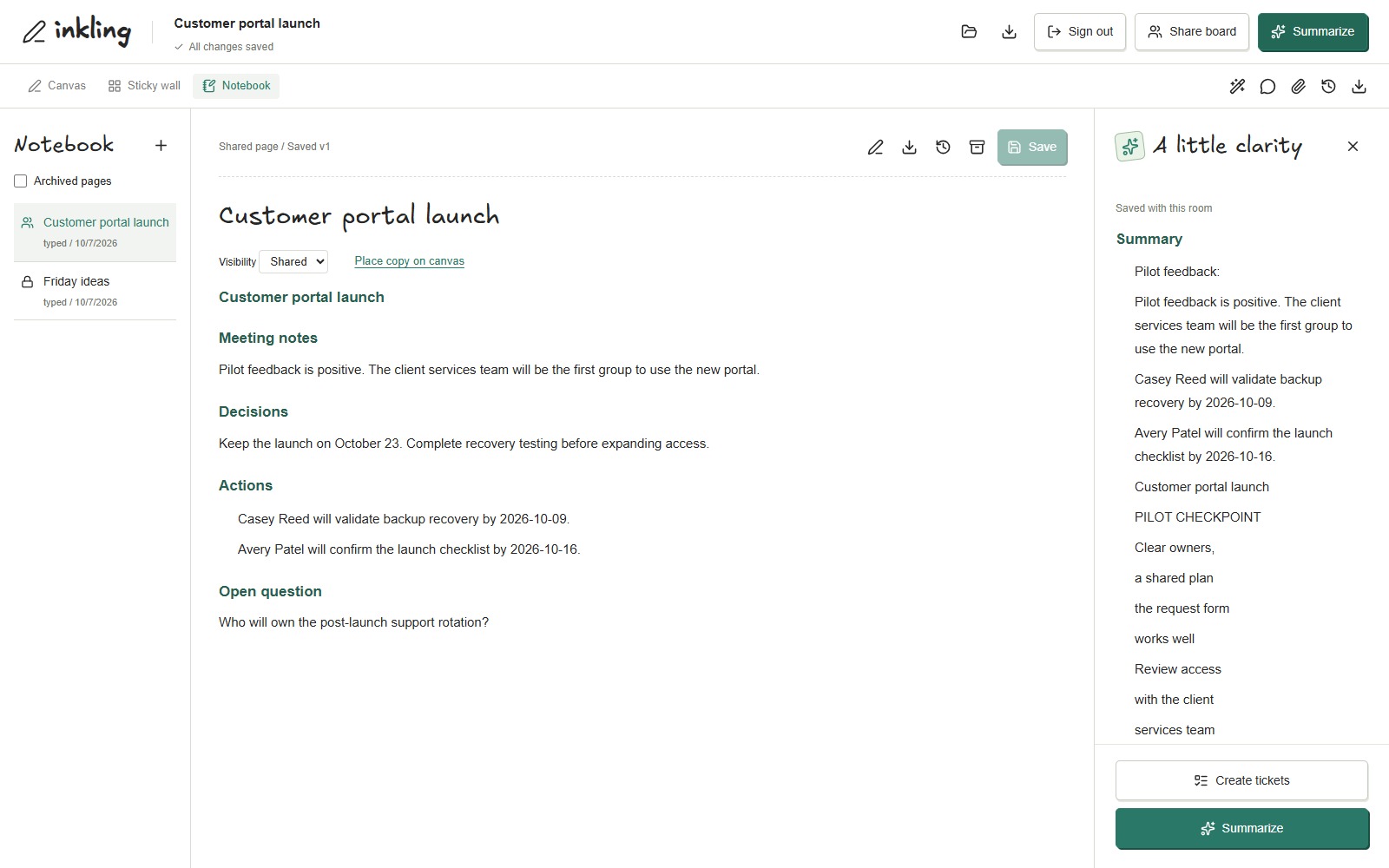
Sentinel Desk + Sentinel Assistant + Patch Sentinel
Bring the work together.
Support your people. Deliver the plan. Keep the endpoint in context.